> ## Documentation Index
> Fetch the complete documentation index at: https://docs.moorcheh.ai/llms.txt
> Use this file to discover all available pages before exploring further.
# Arduino UNO Q
> Install and run Moorcheh Edge on the Arduino UNO Q Linux environment.
Run Moorcheh Edge on the **Arduino UNO Q** Debian side. Docker pulls the **ARM64** image automatically. Install the CLI and Python SDK in a **virtual environment** to avoid Debian PEP 668 warnings and keep `python3` imports working.
**Text store:** The Python client embeds text locally with **BAAI/bge-small-en-v1.5** (384 dimensions). For vector-only workflows, generate embeddings upstream and use [upload-vectors](/cli/upload-vectors).
## What you need
| Requirement | Notes |
| -------------------------------- | --------------------------------------------------------- |
| **Arduino UNO Q** | Linux (MPU) partition with Docker |
| **Network** | Local network or Wi‑Fi during board onboarding |
| **Arduino App Lab / onboarding** | To connect to the board shell (no fixed IP in this guide) |
The published image `moorcheh/moorcheh-edge:latest` includes **`linux/arm64`** and **`linux/amd64`**. On UNO Q, `moorcheh-edge up` pulls the correct architecture for you.
## Step 1 - Connect to the board
During **onboarding**, connect the UNO Q to your **local network**, **Wi‑Fi**, or **internet** as prompted.
Then in **Arduino App Lab**:
1. Connect your **Arduino UNO Q** (USB icon in the bottom status bar).
2. Select **moorcheh-edge** for that board if it is not already active.
3. Click the **terminal** icon (`>_`) in the status bar to open the board **shell**.
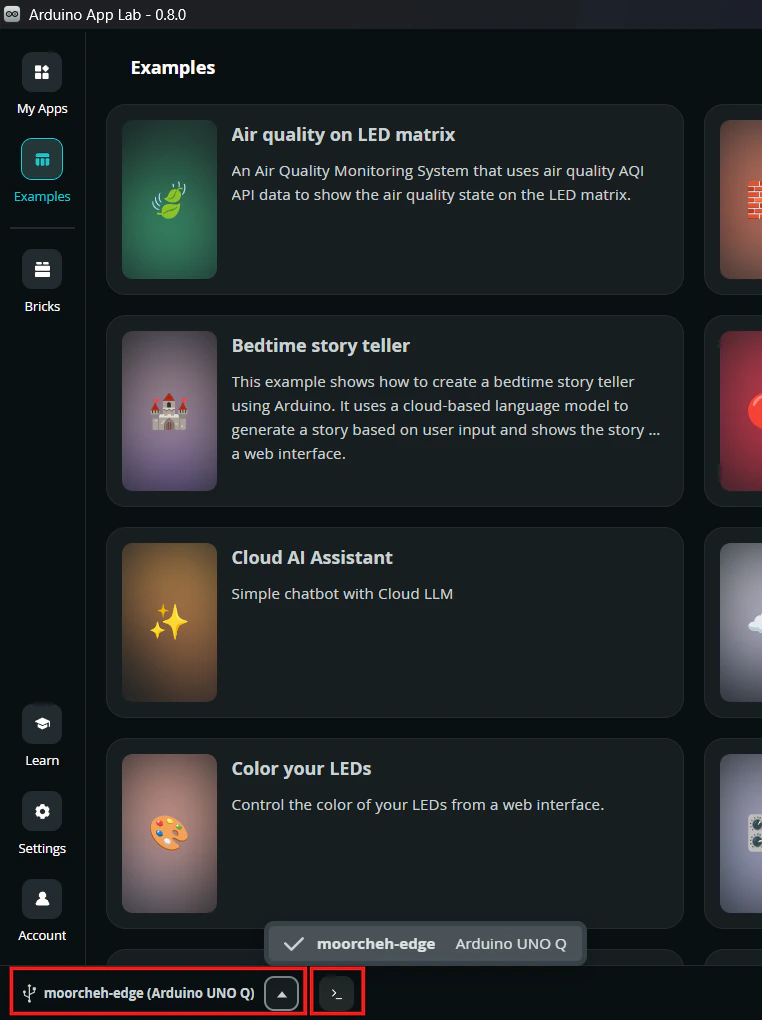 You should land in a shell as user `arduino` on the board.
## Step 2 - Create a virtual environment and install
Debian on UNO Q is **externally managed** (PEP 668). Use a **venv** so both the CLI and Python SDK live in one place:
```bash theme={null}
sudo apt-get update && sudo apt-get install -y python3-venv
python3 -m venv ~/moorcheh-venv
source ~/moorcheh-venv/bin/activate
pip install moorcheh-edge
```
After `activate`, your prompt may show `(moorcheh-venv)`. The **`moorcheh-edge`** CLI and **`moorcheh_edge`** Python package are available in this shell.
Each time you open a **new** board shell, activate the venv again before running commands:
```bash theme={null}
source ~/moorcheh-venv/bin/activate
```
When you are finished in that shell session, deactivate the venv:
```bash theme={null}
deactivate
```
Your prompt returns to normal (no `(moorcheh-venv)` prefix). Deactivating does **not** stop the Moorcheh Edge server - the Docker container keeps running until you run `moorcheh-edge down`.
## Step 3 - Start the server
```bash theme={null}
moorcheh-edge up
```
The CLI pulls `moorcheh/moorcheh-edge:latest` (if needed), starts the Docker container, and creates `~/.moorcheh-edge/data`.
To pin the **0.2.3** release (BGE-small 384-dim + Qwen LLM):
```bash theme={null}
moorcheh-edge up --server-image moorcheh/moorcheh-edge:0.2.3 --with-llm -y
```
**0.2.3** changes text-store dimension from 768 to **384**. After upgrading from an older image, run `moorcheh-edge clear-store -y`, remove `~/.moorcheh-edge/models`, and re-upload documents.
Verify the API:
```bash theme={null}
moorcheh-edge status
```
Expect `"status": "ok"`.
First `up` with **`--with-llm`** on Linux installs Ollama and pulls **`qwen2.5:0.5b-instruct`** (\~400 MB) for [answer](/cli/answer). Default `up` is search-only; use `moorcheh-edge up --skip-ollama` to skip LLM explicitly.
## Step 4 - Run a smoke test
Create `~/moorcheh-edge-test.py`:
```bash theme={null}
nano ~/moorcheh-edge-test.py
```
Paste:
```python theme={null}
#!/usr/bin/env python3
"""Smoke test: health → upload → search → delete → clear."""
from moorcheh_edge import MoorchehEdge
with MoorchehEdge(port=8080, skip_pull=True) as edge:
print("1) Health:", edge.health())
edge.clear_store()
print("2) Upload:", edge.upload_documents([
{"id": "doc-1", "text": "Hello from Arduino UNO Q"},
]))
print("3) Search:", edge.search_text("Hello from Arduino", top_k=3))
edge.clear_store()
print("4) Health:", edge.health())
print("\nDone.")
```
Run it (with the venv **activated**):
```bash theme={null}
python3 ~/moorcheh-edge-test.py
```
The same pattern lives in the repo at `moorcheh-edge-client/examples/moorcheh-edge-test.py` (vector store variant).
## Step 5 - Answer (RAG)
After uploading documents (see [Quickstart](/quickstart)):
```bash theme={null}
moorcheh-edge answer --query "Who won the football match?" --top-k 5 --kiosk-mode --threshold 0.8
```
Uses Ollama with **`qwen2.5:0.5b-instruct`**. First answer may take a minute on UNO Q while the model loads. If no catalog chunks match, the server returns *I don't have enough information to answer that question.* without calling the LLM.
## External embeddings (vector store)
For precomputed vectors, produce embeddings upstream, then upload via CLI or SDK. See [Limits](/limits) for allowed dimensions.
| Topic | Where to read |
| -------------------------- | ------------------------------------------------------------------------ |
| Store modes and dimensions | [Limits](/limits) |
| Upload API | [POST /upload](/api-references/upload) |
| Search API | [POST /search](/api-references/search) |
| Answer API (RAG) | [POST /answer](/api-references/answer) - LLM **`qwen2.5:0.5b-instruct`** |
| Python SDK | [Python client](/python-client/getting-started) |
## Troubleshooting
### Upload fails: `failed writing temp file ... moorcheh_edge_store.tmp`
The container runs as a non-root user. Ensure the data directory is writable:
```bash theme={null}
moorcheh-edge down
chmod 777 ~/.moorcheh-edge/data
moorcheh-edge up
```
### `ModuleNotFoundError: No module named 'moorcheh_edge'`
Activate the venv first:
```bash theme={null}
source ~/moorcheh-venv/bin/activate
python3 ~/moorcheh-edge-test.py
```
### `moorcheh-edge: command not found`
Activate the venv:
```bash theme={null}
source ~/moorcheh-venv/bin/activate
```
### `exec format error` in container logs
Pull the latest multi-arch image (see [Changelog](/changelog)), then:
```bash theme={null}
moorcheh-edge down
moorcheh-edge up
```
## Next steps
* [Quickstart](/quickstart) - upload and search from the CLI
* [CLI reference](/cli/introduction)
* [Limits](/limits) - store cap and dimension rules
You should land in a shell as user `arduino` on the board.
## Step 2 - Create a virtual environment and install
Debian on UNO Q is **externally managed** (PEP 668). Use a **venv** so both the CLI and Python SDK live in one place:
```bash theme={null}
sudo apt-get update && sudo apt-get install -y python3-venv
python3 -m venv ~/moorcheh-venv
source ~/moorcheh-venv/bin/activate
pip install moorcheh-edge
```
After `activate`, your prompt may show `(moorcheh-venv)`. The **`moorcheh-edge`** CLI and **`moorcheh_edge`** Python package are available in this shell.
Each time you open a **new** board shell, activate the venv again before running commands:
```bash theme={null}
source ~/moorcheh-venv/bin/activate
```
When you are finished in that shell session, deactivate the venv:
```bash theme={null}
deactivate
```
Your prompt returns to normal (no `(moorcheh-venv)` prefix). Deactivating does **not** stop the Moorcheh Edge server - the Docker container keeps running until you run `moorcheh-edge down`.
## Step 3 - Start the server
```bash theme={null}
moorcheh-edge up
```
The CLI pulls `moorcheh/moorcheh-edge:latest` (if needed), starts the Docker container, and creates `~/.moorcheh-edge/data`.
To pin the **0.2.3** release (BGE-small 384-dim + Qwen LLM):
```bash theme={null}
moorcheh-edge up --server-image moorcheh/moorcheh-edge:0.2.3 --with-llm -y
```
**0.2.3** changes text-store dimension from 768 to **384**. After upgrading from an older image, run `moorcheh-edge clear-store -y`, remove `~/.moorcheh-edge/models`, and re-upload documents.
Verify the API:
```bash theme={null}
moorcheh-edge status
```
Expect `"status": "ok"`.
First `up` with **`--with-llm`** on Linux installs Ollama and pulls **`qwen2.5:0.5b-instruct`** (\~400 MB) for [answer](/cli/answer). Default `up` is search-only; use `moorcheh-edge up --skip-ollama` to skip LLM explicitly.
## Step 4 - Run a smoke test
Create `~/moorcheh-edge-test.py`:
```bash theme={null}
nano ~/moorcheh-edge-test.py
```
Paste:
```python theme={null}
#!/usr/bin/env python3
"""Smoke test: health → upload → search → delete → clear."""
from moorcheh_edge import MoorchehEdge
with MoorchehEdge(port=8080, skip_pull=True) as edge:
print("1) Health:", edge.health())
edge.clear_store()
print("2) Upload:", edge.upload_documents([
{"id": "doc-1", "text": "Hello from Arduino UNO Q"},
]))
print("3) Search:", edge.search_text("Hello from Arduino", top_k=3))
edge.clear_store()
print("4) Health:", edge.health())
print("\nDone.")
```
Run it (with the venv **activated**):
```bash theme={null}
python3 ~/moorcheh-edge-test.py
```
The same pattern lives in the repo at `moorcheh-edge-client/examples/moorcheh-edge-test.py` (vector store variant).
## Step 5 - Answer (RAG)
After uploading documents (see [Quickstart](/quickstart)):
```bash theme={null}
moorcheh-edge answer --query "Who won the football match?" --top-k 5 --kiosk-mode --threshold 0.8
```
Uses Ollama with **`qwen2.5:0.5b-instruct`**. First answer may take a minute on UNO Q while the model loads. If no catalog chunks match, the server returns *I don't have enough information to answer that question.* without calling the LLM.
## External embeddings (vector store)
For precomputed vectors, produce embeddings upstream, then upload via CLI or SDK. See [Limits](/limits) for allowed dimensions.
| Topic | Where to read |
| -------------------------- | ------------------------------------------------------------------------ |
| Store modes and dimensions | [Limits](/limits) |
| Upload API | [POST /upload](/api-references/upload) |
| Search API | [POST /search](/api-references/search) |
| Answer API (RAG) | [POST /answer](/api-references/answer) - LLM **`qwen2.5:0.5b-instruct`** |
| Python SDK | [Python client](/python-client/getting-started) |
## Troubleshooting
### Upload fails: `failed writing temp file ... moorcheh_edge_store.tmp`
The container runs as a non-root user. Ensure the data directory is writable:
```bash theme={null}
moorcheh-edge down
chmod 777 ~/.moorcheh-edge/data
moorcheh-edge up
```
### `ModuleNotFoundError: No module named 'moorcheh_edge'`
Activate the venv first:
```bash theme={null}
source ~/moorcheh-venv/bin/activate
python3 ~/moorcheh-edge-test.py
```
### `moorcheh-edge: command not found`
Activate the venv:
```bash theme={null}
source ~/moorcheh-venv/bin/activate
```
### `exec format error` in container logs
Pull the latest multi-arch image (see [Changelog](/changelog)), then:
```bash theme={null}
moorcheh-edge down
moorcheh-edge up
```
## Next steps
* [Quickstart](/quickstart) - upload and search from the CLI
* [CLI reference](/cli/introduction)
* [Limits](/limits) - store cap and dimension rules