

python3 imports working.
Text store: The Python client embeds text locally with BAAI/bge-small-en-v1.5 (384 dimensions). For vector-only workflows, generate embeddings upstream and use upload-vectors.
What you need
The published image
moorcheh/moorcheh-edge:latest includes linux/arm64 and linux/amd64. On UNO Q, moorcheh-edge up pulls the correct architecture for you.
Step 1 - Connect to the board
During onboarding, connect the UNO Q to your local network, Wi‑Fi, or internet as prompted. Then in Arduino App Lab:- Connect your Arduino UNO Q (USB icon in the bottom status bar).
- Select moorcheh-edge for that board if it is not already active.
- Click the terminal icon (
>_) in the status bar to open the board shell.
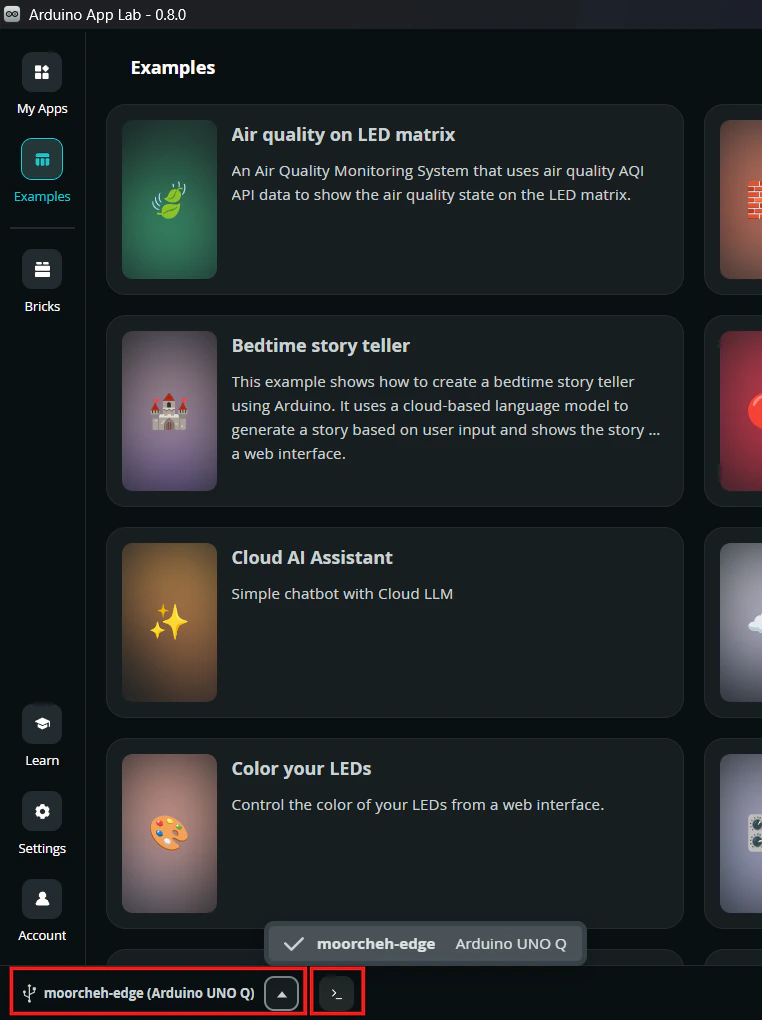
In Arduino App Lab, select moorcheh-edge on your UNO Q and open the terminal from the status bar.
arduino on the board.
Step 2 - Create a virtual environment and install
Debian on UNO Q is externally managed (PEP 668). Use a venv so both the CLI and Python SDK live in one place:activate, your prompt may show (moorcheh-venv). The moorcheh-edge CLI and moorcheh_edge Python package are available in this shell.
Each time you open a new board shell, activate the venv again before running commands:When you are finished in that shell session, deactivate the venv:Your prompt returns to normal (no
(moorcheh-venv) prefix). Deactivating does not stop the Moorcheh Edge server - the Docker container keeps running until you run moorcheh-edge down.Step 3 - Start the server
moorcheh/moorcheh-edge:latest (if needed), starts the Docker container, and creates ~/.moorcheh-edge/data.
To pin the 0.2.3 release (BGE-small 384-dim + Qwen LLM):
"status": "ok".
First up with --with-llm on Linux installs Ollama and pulls qwen2.5:0.5b-instruct (~400 MB) for answer. Default up is search-only; use moorcheh-edge up --skip-ollama to skip LLM explicitly.
Step 4 - Run a smoke test
Create~/moorcheh-edge-test.py:
moorcheh-edge-client/examples/moorcheh-edge-test.py (vector store variant).
Step 5 - Answer (RAG)
After uploading documents (see Quickstart):qwen2.5:0.5b-instruct. First answer may take a minute on UNO Q while the model loads. If no catalog chunks match, the server returns I don’t have enough information to answer that question. without calling the LLM.
External embeddings (vector store)
For precomputed vectors, produce embeddings upstream, then upload via CLI or SDK. See Limits for allowed dimensions.Troubleshooting
Upload fails: failed writing temp file ... moorcheh_edge_store.tmp
The container runs as a non-root user. Ensure the data directory is writable:
ModuleNotFoundError: No module named 'moorcheh_edge'
Activate the venv first:
moorcheh-edge: command not found
Activate the venv:
exec format error in container logs
Pull the latest multi-arch image (see Changelog), then:
Next steps
- Quickstart - upload and search from the CLI
- CLI reference
- Limits - store cap and dimension rules